How agents, MCP integrations, and scheduled jobs can handle standups, triage, and issue creation without constantly breaking your flow.
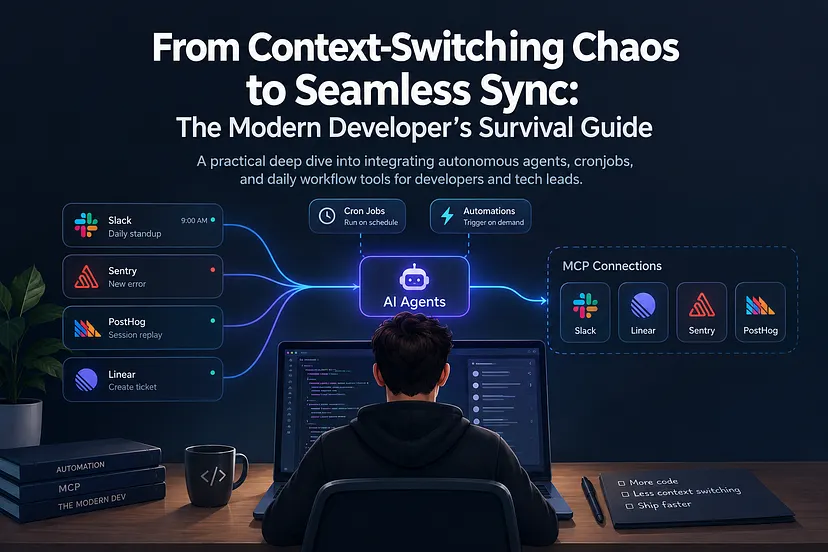
Editorial note: AI tools were used to help organize and refine this article. The research, technical evaluation, and conclusions are the author’s own.
A production error lands in Sentry.
You open the issue, then jump to PostHog to find the affected session. You copy a few details into Linear, add the relevant links, and finally post a message in Slack so the rest of the team knows what happened.
None of those steps is particularly difficult.
The problem is that you stopped coding to do them.
Software development has accumulated a surprising amount of this glue work. Standup updates, ticket creation, incident triage, session replay lookup, inbox filtering, status reporting. Each task is small enough to tolerate on its own, but together they create a workflow where developers spend part of the day manually moving context between tools.
We build systems that automate work for everyone else. Our own workflows are often still held together by browser tabs and copy-paste.
Agents and the Model Context Protocol (MCP) offer an interesting way to change that.
The hidden job: moving context between tools
Senior developers rarely work inside a single application.
A normal day might involve an IDE, Linear, Slack, Sentry, PostHog, Gmail, GitHub, documentation, and whatever internal tooling the company has accumulated over the years.
The issue is not simply the number of tools. It is what happens between them.
Consider a production bug:
- Sentry reports an exception.
- Someone checks how often it occurs.
- They identify the affected user or session.
- PostHog provides the behavior leading up to the error.
- A Linear issue gets created.
- The relevant context is copied into the ticket.
- The team gets notified in Slack.
The developer is effectively acting as an integration layer.
That is the part worth automating.
What changes when an agent can actually use your tools
An AI assistant that can only answer questions is useful, but limited. You still need to collect the information, paste it into the conversation, interpret the response, and then perform the action yourself.
MCP changes that model by giving agents structured access to external tools.
Connect an agent to Linear, Slack, Sentry, or PostHog, and it can potentially retrieve the same information you would have looked up manually. Give it appropriate write permissions, and it can also perform some of the follow-up work.
Add scheduled execution, and those workflows no longer need to begin with a person remembering to run them.
Cursor Automations are one way to build this kind of setup, but the architecture is not really about Cursor. Similar patterns can be implemented with tools such as Claude Code, Codex, or other agent environments that can access the services your team already uses.
The important part is the pattern:
Trigger → gather context → reason over it → take an action
A simple agent architecture
A setup might look something like this:
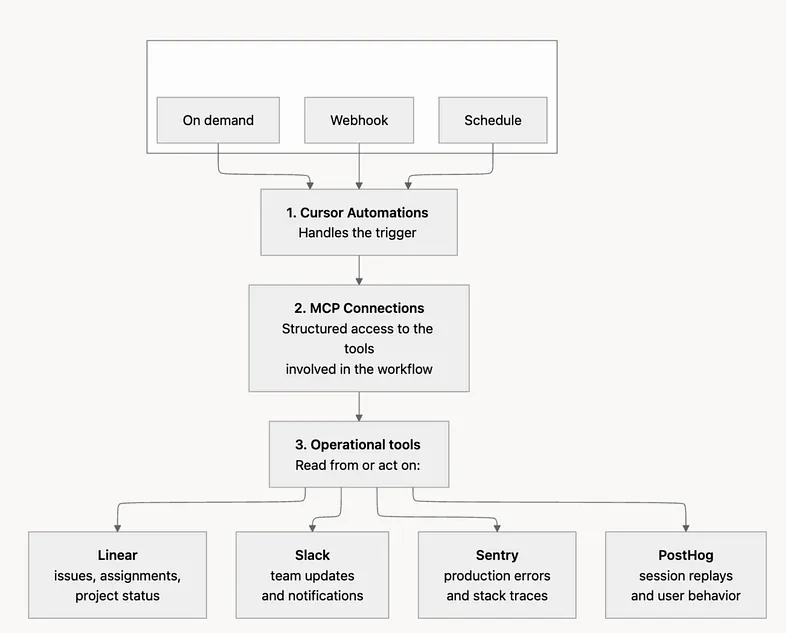
The editor is only the orchestration layer. The real value comes from letting the agent move information between systems without making the developer do it manually.
Connecting the MCP ecosystem
The first step is giving the agent access to the tools involved in the workflow.
For example, connecting Linear and Slack allows an agent to inspect assigned issues and generate a status update. Add Sentry and PostHog, and the same environment can begin helping with production triage.
This is also where permissions matter.
An agent that can read your Linear tickets is very different from one that can create tickets, send Slack messages, modify issues, or mark emails as read.
For workflows like these, I prefer to start with the smallest useful permission set. Let the agent gather information first. Once the output is reliable, add write actions selectively.
Automation is much easier to trust when every new capability is deliberate.
Automating the daily standup
The daily standup is a good first automation because most of the information already exists somewhere else.
If your team works in Linear, the agent can inspect the issues assigned to you, check what changed during the day, and prepare the update automatically.
A scheduled workflow could run every evening:
- Trigger: Cron schedule, for example
0 21 * * * - Agent: Cursor Automation Agent
- Connections: Linear MCP and Slack MCP
The instruction can stay fairly simple:
Fetch the Linear issues assigned to me that were updated or moved today. Summarize completed work, work currently in progress, and blockers. Format the update around what was completed, what is next, and any blockers. Include direct links to the relevant Linear issues and post the result to the
#daily-standupSlack channel.
Behind that small prompt is a useful chain of work.
The agent queries Linear, identifies meaningful changes, turns raw ticket activity into a readable update, and posts it where the team already expects to find it.
The interesting part is not that AI can write a standup message. We already knew that.
The useful part is that nobody had to collect the source material first.
Gmail triage without living in your inbox
Email creates a similar problem.
Most unread messages do not require immediate attention, but you still need to open the inbox to discover which ones do. That is enough to break concentration.
With Gmail connected through MCP, an agent can inspect unread threads and sort them by relevance.
For example, it might identify:
- infrastructure or production alerts,
- client messages,
- requests requiring a response,
- automated notifications,
- newsletters and other low-priority mail.
Instead of repeatedly checking the inbox, you could run the triage periodically and produce a short digest inside your editor or terminal.
You can go further and allow the agent to star important messages or mark routine notifications as read, but this is exactly where I would introduce automation gradually.
A summary is cheap to get wrong.
Changing the state of somebody’s inbox is not.
Turning production errors into actionable tickets
Incident handling is where cross-tool automation becomes more interesting.
A Sentry alert usually contains enough information to begin an investigation, but it rarely contains everything needed for a useful engineering ticket.
An agent connected to Sentry and Linear can close part of that gap.
When a new error appears, the workflow can:
- Inspect the stack trace and available metadata.
- Check frequency and affected users.
- Search Linear for an existing issue covering the same error.
- Decide whether a new ticket is necessary.
- Create a structured bug report with the relevant technical context.
Instead of creating a ticket that says:
“Users are getting an error in checkout.”
the automation can produce something much closer to what the engineer investigating the issue actually needs: stack information, frequency, affected environment, links to the original error, and the evidence used to classify its severity.
That saves more than typing.
It saves reconstruction.
Add PostHog and the bug gets a story
Sentry tells you that something failed.
PostHog can help explain what happened immediately before it failed.
That distinction matters when the error itself is only the final symptom.
Suppose Sentry identifies an affected user or distinct_id. An agent with access to PostHog can search for the corresponding session, locate the relevant replay, and collect the sequence of events preceding the exception.
That context can then be attached directly to the Linear issue.
Instead of asking the next developer to reproduce the entire investigation, the ticket could already contain:
- the Sentry exception,
- frequency and affected users,
- the relevant PostHog session,
- the replay URL,
- key events before the failure,
- and links back to the source systems.
A good ticket should make the next step easier.
This kind of automation can build that context before someone even picks the issue up.
The real payoff is fewer broken workflows
It is tempting to evaluate these automations by asking how many minutes each one saves.
That misses part of the point.
Writing a standup update might take five minutes. Creating a Linear issue may take another five. Checking Sentry or finding a PostHog replay may not take much longer.
But those minutes rarely happen in isolation.
They happen in the middle of something else.
A developer stops thinking about a feature, moves into Sentry, reconstructs a production issue, opens another tool, copies information around, posts an update, and then tries to recover the mental model they were holding before the interruption.
The cost is not just administration.
It is restarting.
Agents are particularly useful when they eliminate those small operational loops entirely.
Do not automate the entire workflow on day one
There is a less exciting side to agent automation: an agent with write access can also make mistakes faster than you can.
That is why I would not begin by building an autonomous system with permission to modify everything.
Start with one workflow that is:
- repetitive,
- easy to verify,
- built from structured information,
- and annoying enough that you will notice when it disappears.
A standup summary is a good example.
Let the agent generate it without posting. Review the output for a week. Then let it post automatically. After that, move on to something with slightly higher stakes.
The same principle applies to production triage.
First let the agent gather context.
Then let it recommend a ticket.
Only after you trust that behavior should it create the ticket itself.
The technology is interesting. The permission model is what makes it usable.
Stop being the integration layer
The goal is not to automate software engineering.
It is to automate the glue work surrounding software engineering.
Developers should still decide what deserves to be built, how systems should behave, which trade-offs are acceptable, and when an automated conclusion does not make sense.
But there is little value in having a senior engineer manually copy an error ID from Sentry into PostHog, paste a replay into Linear, and then rewrite the same information in Slack.
That is exactly the kind of work machines are good at.
Once agents can securely access the tools around the development environment, the IDE stops being only the place where code is written. It can also become the place where operational work is coordinated.
And the best automation may be the one you eventually stop noticing.
If you want to experiment with this architecture, a good starting point is the documentation for Cursor Automations, the Model Context Protocol (MCP), and the agent integrations available for tools such as Claude Code and Codex.
What repetitive task pulls you out of your editor most often? That is probably the first workflow worth automating.