When AI touches every part of development, your tools better play nice together.
We’re living in a weird moment. AI is infiltrating every stage of software development — from discovery sessions with Gemini, to UI design with Lovable, to coding with Claude Code.
Last month, we were using Claude Desktop to design the architecture of a new microservice. The conversation flowed perfectly: Claude suggested service boundaries, recommended tech stacks, and even identified potential bottlenecks. But when it came time to share this architecture with the team?
That’s when it hit me. We’re using AI to accelerate every part of development, but we’re still manually bridging the gaps between text and diagram tools.
What if Claude could just… draw the diagrams on its own?
The Integration Revolution
Here’s what I’ve learned after going all-in on AI-assisted development: The magic isn’t in any single AI tool. It’s in making them work together seamlessly.
Think about your current workflow:
- AI helps you brainstorm features
- AI helps you design interfaces
- AI helps you write code
- But you still manually create architecture diagrams
That last part? That’s what I fixed.
Enter Eraser.io + Claude Desktop:
Eraser.io isn’t just another diagramming tool. It’s code-first diagramming: you write simple syntax, and it creates beautiful diagrams. Sound familiar? It’s like Mermaid, but on steroids.
And here’s the kicker: it has an API.
MCP (Model Context Protocol) enables Claude Desktop to communicate with external services. Eraser has an API. You see where this is going.
Building the Bridge: Claude Code as My Co-Pilot
The beautiful irony? I used Claude Code to build the integration that enhances Claude Desktop.
“Help me build an MCP server that integrates with Eraser’s API”
What followed was a fascinating meta-experience — using AI to build AI tools. Claude Code helped me:
- Structure the MCP server properly
- Handle Eraser’s API authentication
- Create intelligent error handling
- Build a validation system that helps
The entire project was completed in under 4 hours. Not because I’m some coding genius, but because Claude Code understood both the problem and the solution.
The Secret Sauce: Teaching Claude to Speak Eraser
Here’s what makes this integration special — it’s not just API calls. I created comprehensive project instructions that teach Claude Code how to think in diagrams.
Sequence Diagrams- Basic format: Actor > Target: Message- Activation blocks: User > API: Request { ... }- Loops and conditions supported## Cloud Architecture- AWS icons: [icon: aws-ec2], [icon: aws-lambda]- Auto-layout with directional hints- Service grouping with containers## Entity Relationships- Table definition: users { id, name, email }- Relationships: users.id > posts.user_id
This isn’t just documentation. It’s Claude’s visual vocabulary. Now, when you ask for a diagram, Claude knows exactly how to visually express architectural concepts.
Take a look at my Project Instructions for Claude Desktop file in the repo.
How to try it? (The 2-Minute Version)
- Build with Docker (because nobody has time for dependency hell):
docker build -t eraser-mcp:claude .Note: You can run the /scripts/build-claude-docker.sh A shell script that performs this task and provides instructions afterward.
2. Add to Claude Code config:
{
    "mcpServers": {
        "eraser": {
            "command": "docker",
            "args": [
                "run",
                "-i",
                "--rm",
                "-e",
                "ERASER_API_KEY=your_key",
                "eraser-mcp:claude"
            ]
        }
    }
}
3. Reboot Claude Desktop and start creating:
"Create an architecture diagram for our API gateway pattern"
That’s it. No manual diagramming. No context switching. Just natural conversation that produces professional diagrams.
Want to dive deeper or contribute? Check out the GitHub repository — PRs welcome!
Real-World Impact: Documentation That Actually Happens
Let me describe an example of how Eraser integration with Claude Desktop works. This was the initial prompt:
“Create an eraser diagram with a standard ECS webserver with an RDS database on a VPC with the corresponding subnets and load balancers to satisfy AWS Well-Architected Framework”
And the result was:
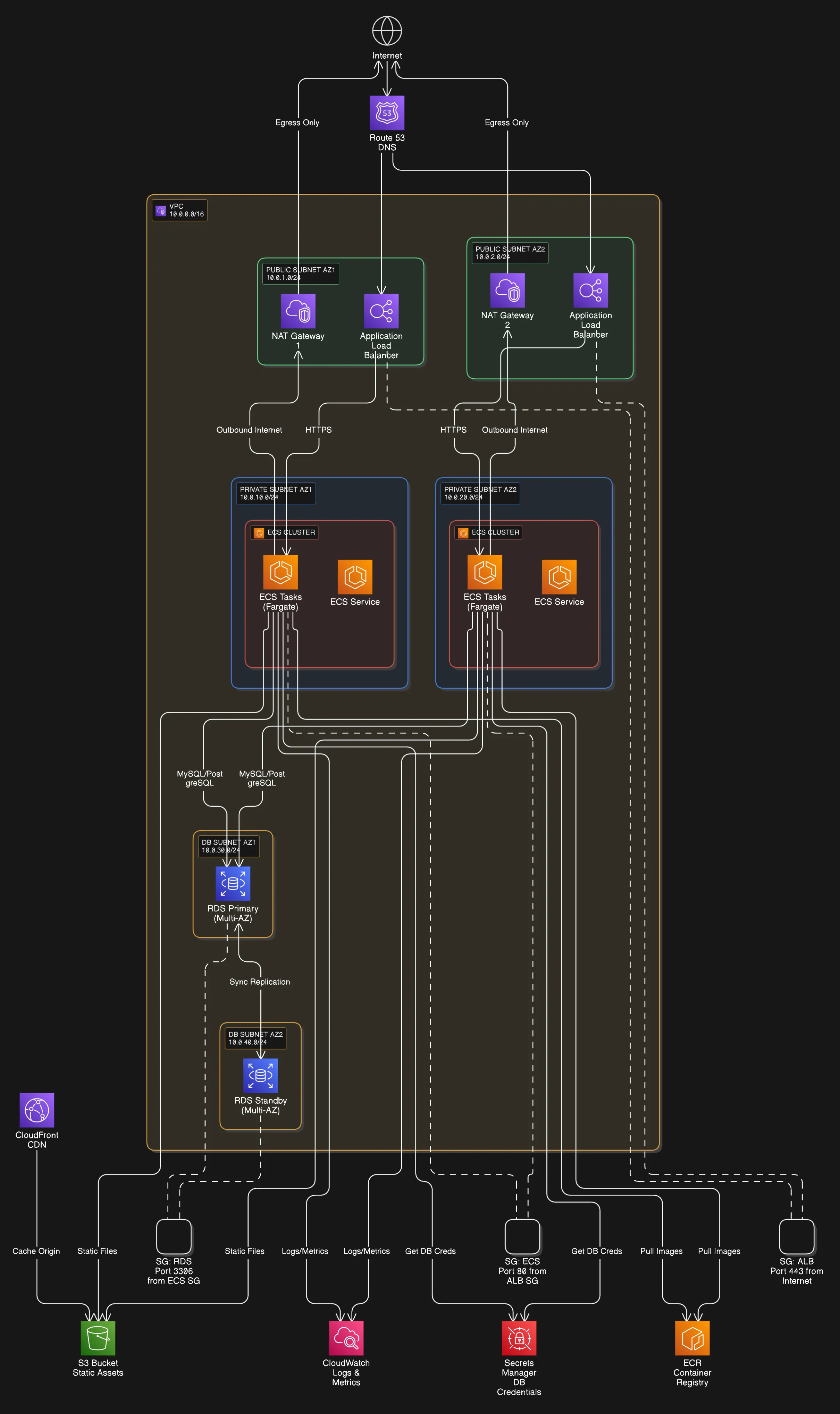
The resulting output was a big monster diagram which did not represent exactly what I was looking for, so luckily I could iterate through it until I got it the way I wanted:
“That is great, but I do not need that much detail, make it more high-level just to describe main concepts, and make it left-to-right”
And this was the beautiful result:
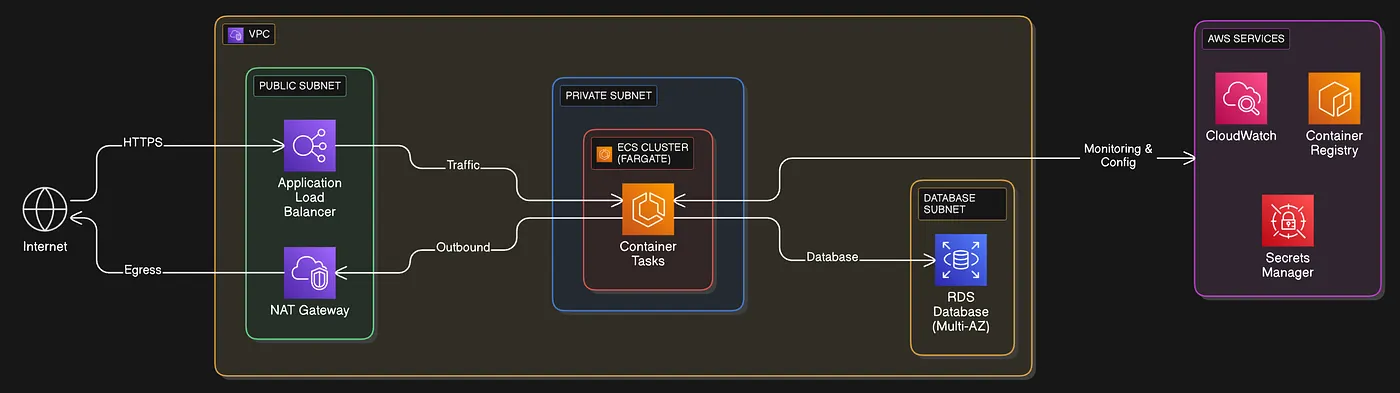
I not only got the image output but also a link which allowed me to go straight to Eraser.io and start editing the diagram the way I wanted, moving things around and improving the diagram structure through code.
The Unexpected Benefits
1. Faster Architecture Reviews
“Can you show me how the payment service connects to the order service?”
Before: 30 minutes of whiteboarding. Now: 20 seconds to generate a focused diagram
2. Onboarding That Doesn’t Suck
A new developer joins. Instead of pointing them to outdated wikis:
"Create a high-level diagram of our processes."
Current, accurate, visual documentation in seconds.
3. Design Decisions That Stick
When you can visualize ideas immediately, better decisions happen. “What if we add a cache here?” becomes “Let me show you” instantly. The visual feedback loop accelerates the development of good architecture.
The Bigger Picture: AI-Powered Development Workflows
This Eraser integration is just one piece of a larger puzzle we’re solving at White Prompt. We’re building bridges between:
- Discovery (AI-powered user research)
- Design (AI-assisted UI/UX)
- Design Architecture (AI-generated diagrams)
- Development (AI pair programming)
- Delivery (AI-powered deployment tools)
Each bridge removes friction. Each integration keeps you in flow. Together, they’re transforming how we build software.
The Bottom Line
We’re in the middle of an AI revolution in software development. But the real revolution isn’t in any single AI tool — it’s in making them work together seamlessly.
If you’re using AI for coding but still manually creating diagrams, you’re living in two different centuries. It’s time to bring your visual documentation into the AI age.
The setup takes 2 minutes. The time saved is measured in hours per week. But the real value? Never breaking flow to create documentation.
Because the best documentation is the kind that creates itself.
Ready to add visual superpowers to your Claude Desktop setup? Grab the MCP server on GitHub and start creating diagrams with just a conversation.
At White Prompt, we’re not just adopting AI — we’re connecting it. This integration is part of our mission to make AI-powered development a practical reality in the real world.