Amazon Cognito is a serverless user identity service provided by Amazon Web Service. Amazon Cognito makes it easy to manage authentication and authorization securely through synchronizing application data for users across their devices.
It facilitates the creation of unique identities for users through many public federated identity providers such as Amazon, Facebook, Google, and Apple, supporting unauthenticated guests.
Customizing the authentication flow with Amazon Cognito is very easy. It allows the execution of custom Lambda functions triggered by certain events of the users’ lifecycle, choosing between several different authentication flows. These service features make it possible to create unique authentication flows other than the traditional username and password or federated login with identity providers.
Problem to Solve
In a project we recently developed, the Product Team focused on users sharing their account credentials.
To ensure that only one person was able to authenticate themselves in a particular user account, we figured that an authentication flow involving only a username and password wouldn’t be enough.
Since Cognito supports custom auth flows via Lambda Functions Triggers, we decided to implement a passwordless sign-in by delivering a code to the user’s mobile phone. This code, valid only for one authentication, expires after a period of time and is required for the user to be authenticated.
Although it’s possible for a group of people to share a device or virtual phone number in order to share a user account, it’s definitely more difficult than the traditional username/password authentication flow.
Although the most common approach to deliver SMS in AWS is using SNS, we will use the SendMessage API since we make extensive use of Amazon Pinpoint in this project.
In Cognito, the Authentication flow’s configuration depends on the Application Clients created for each particular User Pool.
We needed to transition from secure remote password authentication to the new custom authentication flow for the existing users in the Cognito User Pool. This was achieved by creating a new Application Client for the User Pool that supports the new authentication flow.
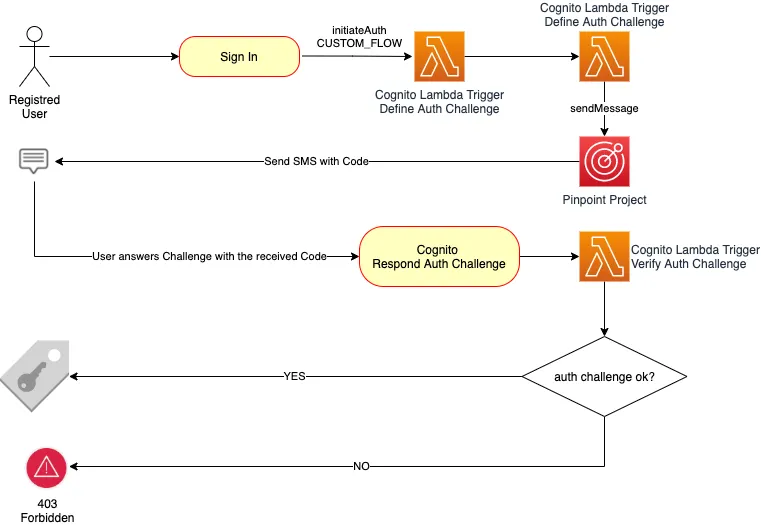
Cognito User Pool Authentication Flows
The simplest authentication flow in Cognito is a 2-step process:
- The Application Client initiates the authentication request using Secure Remote Password protocol (SRP) supported by Cognito Identity client libraries, invoking the InitiateAuth method.
- The Cognito User Pool then responds with the authentication challenge parameters.
- The client must then call back to the User Pool with the authentication challenge answer, invoking the RespondToAuthChallenge operation.
- If the previous call succeeds it will return the user’s tokens. If answering another challenge is required, no tokens will be returned; a session will be returned instead, and the Application Client should call again RespondToAuthChallenge with that session.
The use of Custom Authentication Flows can help to implement challenge-response-based authentication models. The challenges and verification of the responses are controlled through Lambda triggers:
- The Application Client initiates the authentication by invoking the InitiateAuth while also specifying the type of authentication (AuthFlow: CUSTOM_AUTH).
- The User Pool then invokes the Define Auth Challenge Lambda trigger, passing any previous challenges and their responses as a parameter, and it then returns the Challenge Name. This Lambda Trigger is a state machine that controls the evolution of the user’s auth-flow through the challenges.
- When the Define Auth Challenge trigger returns CUSTOM_CHALLENGE as the challenge type, then the User Pool calls the Create Auth Challenge Lambda trigger, with the Challenge Name as a parameter. It returns the auth challenge and its parameters to evaluate the user’s response. (This is a good time to also trigger the submission of the login code to the user’s mobile phone).
- Then the Application Client should invoke the RespondToAuthChallenge operation including the SMS login code as the answer to the auth challenge.
- When the User Pool gets the challenge’s response, it will use it as a parameter to invoke the Verify Auth Challenge Lambda trigger, which will return a boolean to indicate if the answer was valid.
- With the response of the Verify Auth Challenge Lambda trigger, the User Pool will call the Define Auth Challenge trigger again, and then it will return the user’s tokens to the Application Client.
Then any application using these user tokens generated by Cognito must use the User Pool public sign in key for verification.
When the authentication challenge is produced during the call to the Create Auth Challenge trigger, the API call to Amazon Pinpoint’s SendMessage action should be performed to request the submission of the transactional SMS login message.
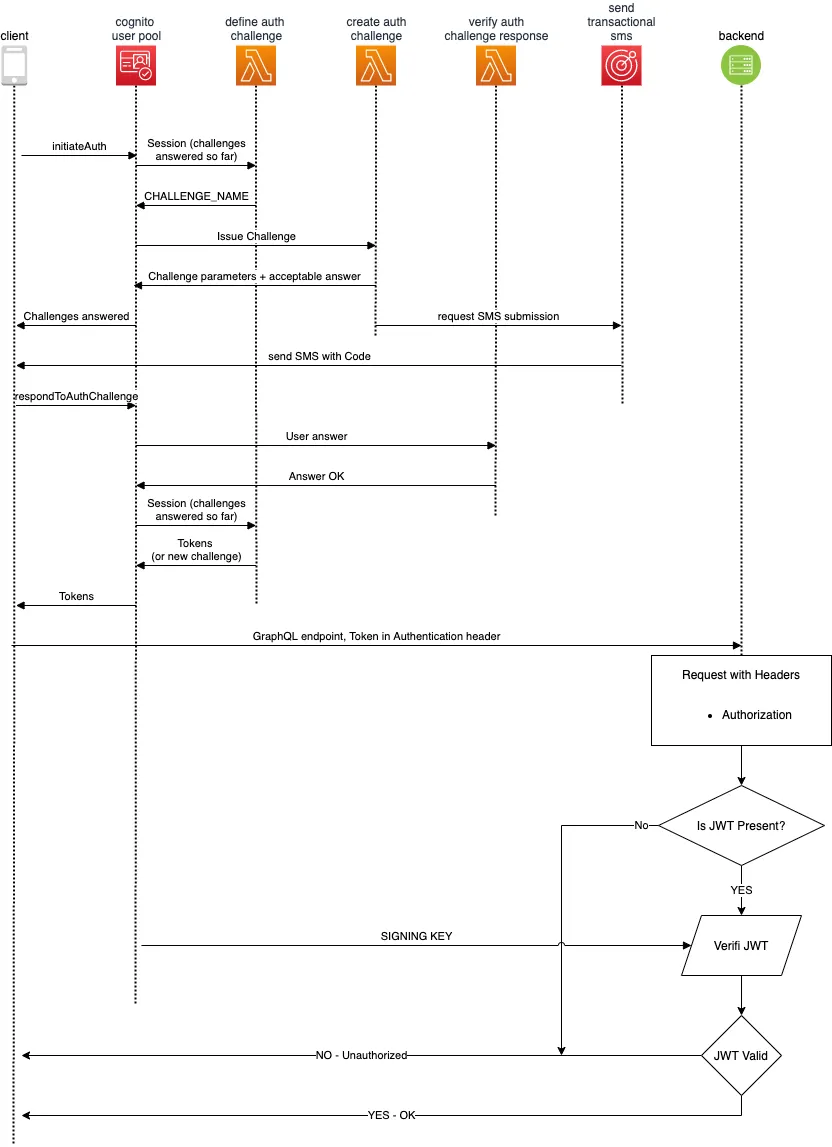
How to simplify the submission of transactional SMS with Amazon Pinpoint
Amazon Pinpoint is AWS’ inbound and outbound marketing service, providing communication channels like email, SMS, voice, and push notifications. It’s easy set up and usability enables flexible, scalable marketing communication scenarios.
To send transactional SMS with Pinpoint you’ll need to create a Pinpoint Project and enable the SMS channel for it, specifying Transactional as the default message type. It’s also necessary to provide an originating phone number. If you don’t have one, you can request one to AWS directly in Pinpoint’s SMS channel configuration screen for a small monthly fee.
Journey
Since we already created the Cognito User Pool and were already using SRP username/password, the process turned out to be extremely straightforward.
Cognito user analytics can be configured to seamlessly integrate with Pinpoint. However, Pinpoint isn’t available in all AWS Regions. For instance, we had our Cognito User Pools in us-east-2 but Pinpoint isn’t available there. Luckily when that’s the case, the User Pools created in those regions that do not support Pinpoint will integrate with Pinpoint projects in other regions.
We created the Pinpoint Project, enabling the SMS channel, and requested an originating phone number to send the messages.
Then we configured the Lambda Triggers for Cognito using the Serverless Framework to automate their deployment because it supports our use case, making it easy to replicate identical configurations across different environments.
Implementing SMS submission with Pinpoint
After setting up the necessary configuration in the Pinpoint Project to enable the SMS Channel, and requesting the originating phone number, you get a couple of values that need to be used in order to call Pinpoint’s SendMessage action:
- Pinpoint Project Identifier
- SMS Originating Number
- Originating Number SMS Keyword
We implemented a small helper method to streamline the call to the SendMessage action:
This way, it’s very easy to issue SMS to any phone number from Cognito’s Lambda Triggers.
Implementing the Cognito Lambda Triggers
Define Auth Challenge
This lambda function receives an event that has a request object containing the details of the request and the session of the user during the auth flow. To handle the flow, you need to set the values of the event’s response object and return the event with these values set:
- issueTokens is a boolean value that tells the user pool if it should include the tokens in the response or not.
- failAuthentication is a boolean that indicates if the auth request should be a failure or not.
- challengeName is a string that should be returned only after the initial call, setting the type of authentication challenge to be issued to the user.
First, we validated that the attempt is for a Custom Auth Flow, otherwise, we fail the authentication request. Then we check that the user has provided a wrong answer for the same authentication challenge no more than 3 times, otherwise, we fail the authentication. If the user has provided the right answer we issue tokens. If this is the first call in the auth flow, we set the challenge name.
Create Auth Challenge
This lambda function is called by Cognito after it received the response of the Define Auth Challenge. The event parameter received by this function contains the auth challenge session in the request object, which is useful to know the attributes of the user who initiated the authentication and to understand the status of the challenge. The event also contains a response object that contains public and private challenge parameters, in addition to challenge metadata. The function should set these values and return the event.
The public challenge parameters are returned back to the client app that originated the authentication flow. It’s useful to display hints to the user or other data that should be available to the app client.
The private challenge parameters are not available to the client application, but they can be checked later during the execution of the Verify Auth Challenge Lambda Trigger.
The challenge metadata is available later on during future invocations of the Create Auth Challenge function.
During the first execution, we define the six-digit number and send it to the user’s phone number. If it’s a further execution in the context of the session we can infer the code from the challenge metadata.
Keep in mind that for good usability it’s always good to provide additional details in the SMS message with the login code, such as providing the name of the app and any other contextual information useful to the user to understand what they’re receiving.
Verify Auth Challenge
This function is invoked by Cognito when it receives the challenge answer from the user.
The event parameter contains the login code in its request object (which is the correct answer to the challenge) within the privateChallengeParameters object. The answer to the user (which should match the secret login code) in the challengeAnswer attribute of the request.
We verify that the challenge answer and the secret login code in the private challenge parameters are equal. If they are, we set the event response’s answerCorrect attribute as truthy and we return the event. The User Pool will check that the answer is correct and if that’s the case, will issue the tokens to the user when it retriggers the Define Auth Challenge function. Otherwise, it will be considered a wrong answer to the challenge.
Those are the three lambda triggers required to implement the described use case. Remember to take into consideration that delivering SMS will generate charges, varying based on the destination country.
Implementing the client-side
AWS provides excellent libraries to interact with Amazon Cognito’s Application Clients. In particular, this NPM module allows you to do it from a web browser. Its readme provides extensive documentation and code examples, but here we will summarize the key takeaways to implement the use case.
First it’s necessary to initialize the library’s user pool object:
Then, with the user pool object and the user’s username, we can initialize a Cognito user object:
With the Cognito user initialized, it’s possible to initiate the auth against the User Pool:
After issuing the initiate auth call, the user should get the SMS code on their phone. With that code it’s possible to send the answer to the auth challenge:
Conclusion
Amazon Cognito is a powerful service that allows developers to architect and implement advanced authentication and authorization flows. It provides high out-of-the-box availability and scalability. Since it’s serverless and 100% managed, it significantly reduces operational overhead.
When combined with Pinpoint, it increases possibilities by leveraging multichannel communication, advanced analytics, and segmentation.
Do you have an application that requires custom authentication flows or enabling advanced marketing and analytics? Talk to us, we can help you!
Further Reading and Links
- Example code
- Cognito Lambda Triggers Documentation
- Pinpoint SendMessage Action
- Secure Remote Password Protocol
- Amazon Pinpoint Service Homepage
- How to enable the SMS Channel in Pinpoint
- How to request a dedicated long code number
- Amazon Pinpoint phone number pricing
- Amazon Pinpoint regional mapping
- Amazon Cognito events in Serverless Framework
- Cognito Identity Provider NPM Package